
Time tracking on your own server: Kimai in practice
Juliusz Tomeczek,
In the previous article in this series, I described Plane, the program where I run my projects. I also promised to describe the time tracking program that receives projects and tasks from Plane. That program is Kimai (opens in a new tab), an open source time tracking application. You can install it on your own server or use the cloud service run by its developers.
In this article, I describe how I use Kimai, what it replaces and where its limits are. I don’t name clients or share my rates or server settings, because those details would let someone reconstruct my technical setup and my billing arrangements with clients.
How Kimai organizes time entries
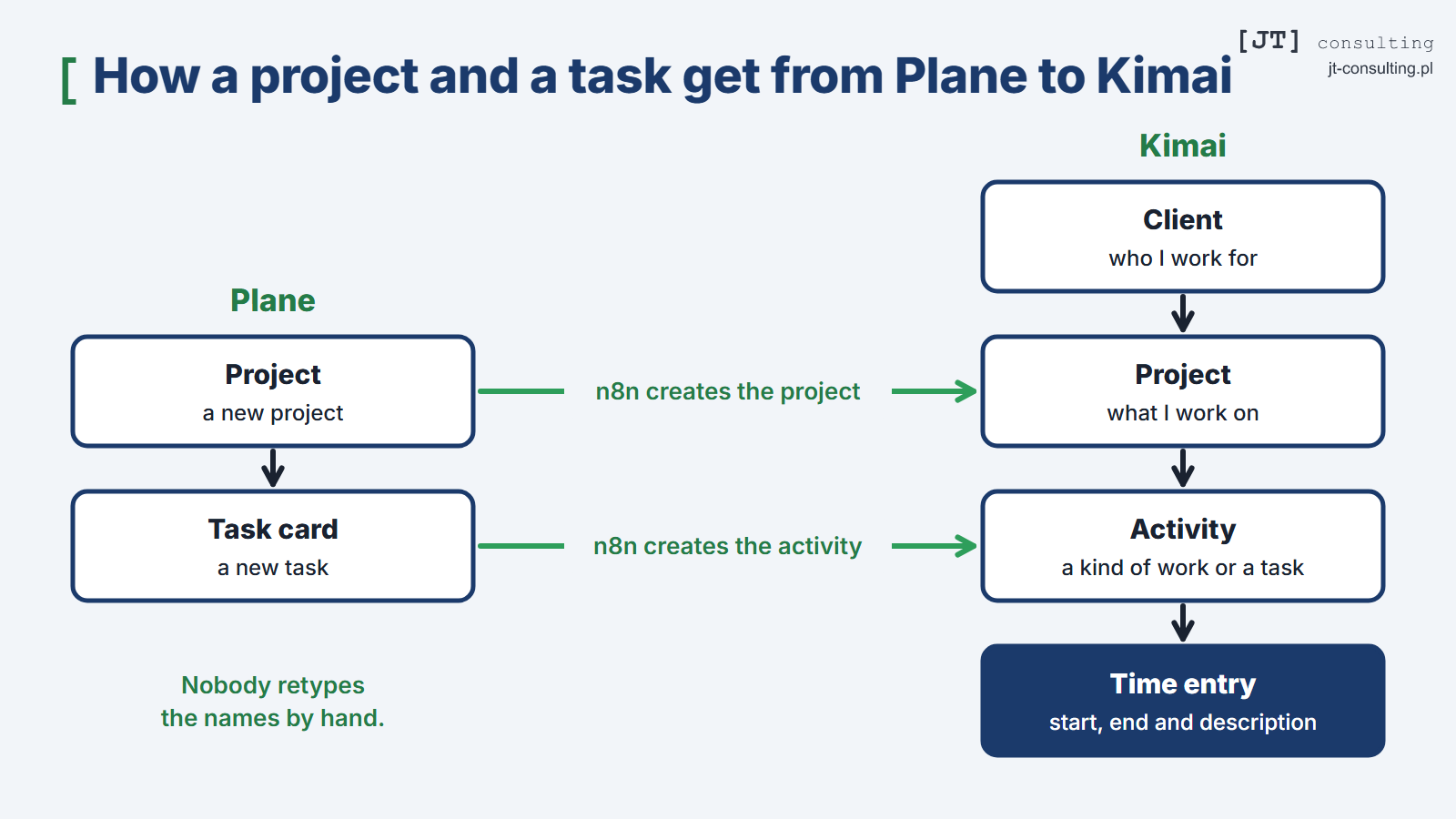
Kimai organizes time entries on three levels. The client is at the top, the project sits below the client, and below the project is the activity, which is a specific kind of work or a task. Every time entry points to a project and an activity and has a start time, an end time and a description. You can record time with a timer that you start when you begin working and stop when you finish, or you can enter it by hand afterward.
You can assign an hourly rate and a budget to each level, and the budget can be set in hours or in money. Reports show time by person, client, project and activity for a chosen period. Kimai can also turn recorded hours into an invoice based on a template and export the data to a file. It also has an API that lets other programs read data from Kimai and write new data to it.
Projects and tasks come from Plane
I don’t create projects and activities in Kimai by hand. When I create a new project in Plane, the automation tool n8n creates a project with the same name in Kimai, and every new task card becomes an activity there. Because n8n copies the names and nobody retypes them, the project and task I log hours against in Kimai match what I see in Plane.
 (enlarge)
That way, when a task is closed, I know how much time it really took. I use the time records mainly to judge whether a project pays off, and only secondarily for billing.
Tracking time when working with AI agents
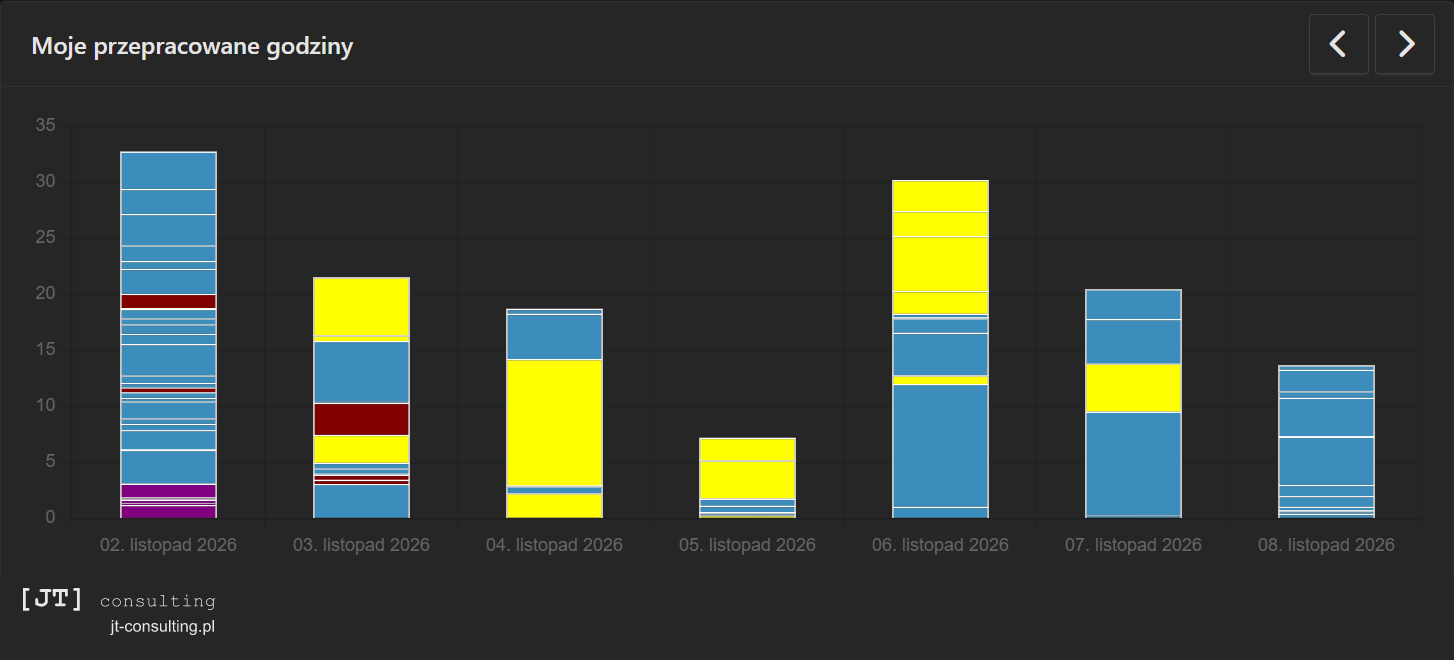
Since AI agents started writing the code for my websites, tracking my time has gotten more complicated. An agent keeps working while I’m doing something else, and more and more of my own work consists of planning tasks, handing them off and reviewing the results. That’s why I no longer measure only the time I spend at the keyboard. I measure whole blocks of work on a task. The first block runs from the moment I start planning a task to the moment I hand the assignment to the agent. The second begins when the agent delivers a report on the completed work and ends when I’ve reviewed and accepted that work. I record the time an agent works on its own as a separate entry. Those entries overlap with my work on something else, and with each other when several agents work at once, which is why the total for a single day can exceed 24 hours. You can see this in the chart below, which covers one week: two of the bars rise above 24 hours. On one project, I compared the two ways of measuring my time. Keyboard time alone came to less than half of the time measured in blocks.
 (enlarge)
I’ve also adopted two rules. First, the record in Kimai is the final word on how long the work took. Notes and task comments can quote hours from Kimai, but when they show different hours than Kimai does, I correct the note or the comment, not the time record. Second, an AI agent can draft time entries from the log of a work session, but it doesn’t save them without my approval. It first shows me a list with the project, activity, hours and description for each entry, and it saves the entries only after I confirm that list.
What Kimai replaces and what it costs
Running Kimai on your own server replaces a subscription-based time tracker. Kimai’s developers also offer it by subscription, as a cloud service hosted in Germany. The cloud version is billed per user per month and comes with a 30-day free trial. Anyone can download and install the self-hosted version at no charge, because Kimai is open source software under the AGPL license. So my own installation costs me only the server, which I would be running anyway, plus the time I spend on updates.
More important than the cost is where the data lives. Time entries show who I work for, what I work on and how many hours each task takes me. When Kimai runs on my server, that information doesn’t go to the developers’ servers, and I decide who has access to it and how long I keep it.
Kimai’s limitations
Running your own installation takes experience. The Kimai documentation says plainly that maintaining the program on your own server requires technical knowledge and that mistakes can lead to data loss, security vulnerabilities or downtime. For people without experience administering servers, the developers recommend their cloud.
Some features require paid plugins. Time tracking, rates, budgets, reports, invoices and exports are part of the basic, free version. Three things are not: attendance tracking with overtime, vacation and sick leave; expense tracking; and custom fields for time entries. If you install Kimai on your own server, you have to buy them as plugins from the developers’ store. In the cloud, they come with the more expensive plan.
Kimai needs a specific database. The program works only with MariaDB or MySQL. If the other programs on your server use a different database, you have to run a separate one for Kimai, which means one more program to update and more data to back up.
You have to keep checking the connection to other programs. At some point, most likely after an update, Kimai on my server started rejecting task names that contained certain characters, such as quotation marks. Over about six weeks, a dozen or so tasks from Plane failed to reach Kimai for that reason, and I didn’t notice they were missing until a server review. I added the missing tasks, and n8n now strips those characters from each task name before sending it to Kimai. So after every update, it’s worth checking that a new task from Plane shows up in Kimai.
The program won’t track your time for you. Kimai saves every entry, but it won’t remind you to stop the timer, and it won’t decide which task an hour belongs to when you spent it on two things at once. You have to set your own rules for tracking time and stick to them without the program’s help.
Does a small business need its own Kimai installation?
If you work alone, or on a team of a few people without its own server, the developers’ cloud will serve you well. Running your own installation makes sense in three situations: when your team grows and the per-user fee starts to hurt, when you don’t want to keep information about clients and rates with an outside provider, and when time tracking needs to connect to other programs on the same server, such as a project management tool.
On the Own server instead of subscriptions page, I describe how a company can run its own server with programs chosen to fit the way it works.
What comes next in this series
In the next article, I’ll describe my CRM, the tool where I keep records of clients and my interactions with them. It also runs on my server.
Topics:
This text was written with the help of artificial intelligence tools, because that is how I work every day. I have checked every claim in it and I stand behind it under my own name. The drawings in this section were made the same way: they are vector graphics, written as code with the same help.
Juliusz Tomeczek, JT CONSULTING