
Automation on your own server: n8n in practice
Juliusz Tomeczek,
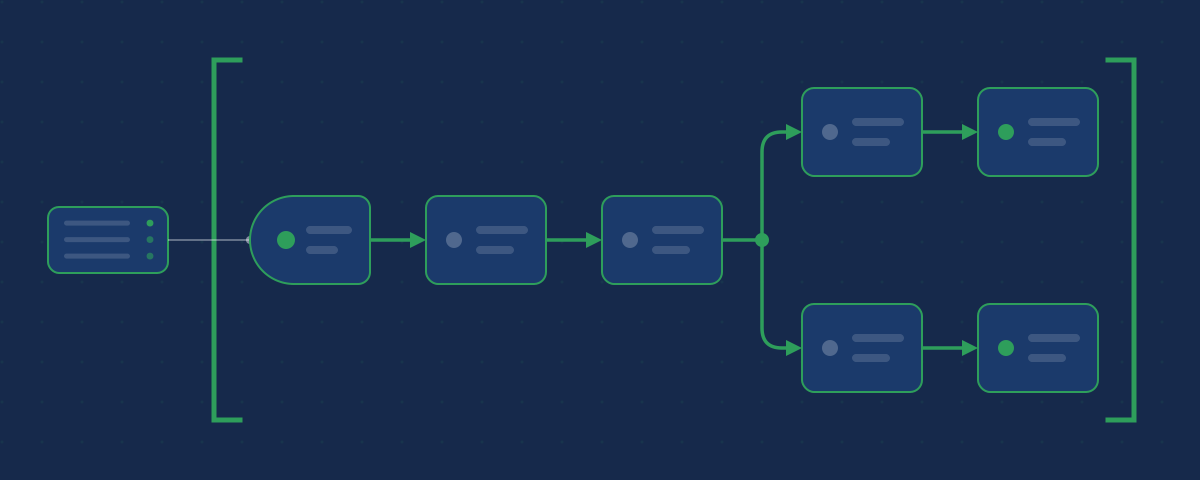
In the previous article in this series I described the monitor that watches my websites and promised a tool that connects the other programs on my server. That tool is n8n (opens in a new tab), an automation platform that you can install on your own server or buy as a cloud service from its creators. n8n does repetitive work for me: it moves data from one program to another, turns raw results into readable messages, and notifies me when something needs my attention.
I describe what I use it for and where it can let me down. I do not list my workflows, addresses or settings, for the same reason as with monitoring: such a list would be a map of the back end for anyone who wanted to break into it.
How a workflow works
In n8n you build automation on a canvas: you lay out the steps like building blocks and connect them with arrows, and the whole set of steps is called a workflow. Every workflow starts with a trigger, an event that n8n waits for. It can be a change in another program, a date in the calendar, or a request from outside, for example from a form on a website. The following steps fetch data, transform it and pass it on.
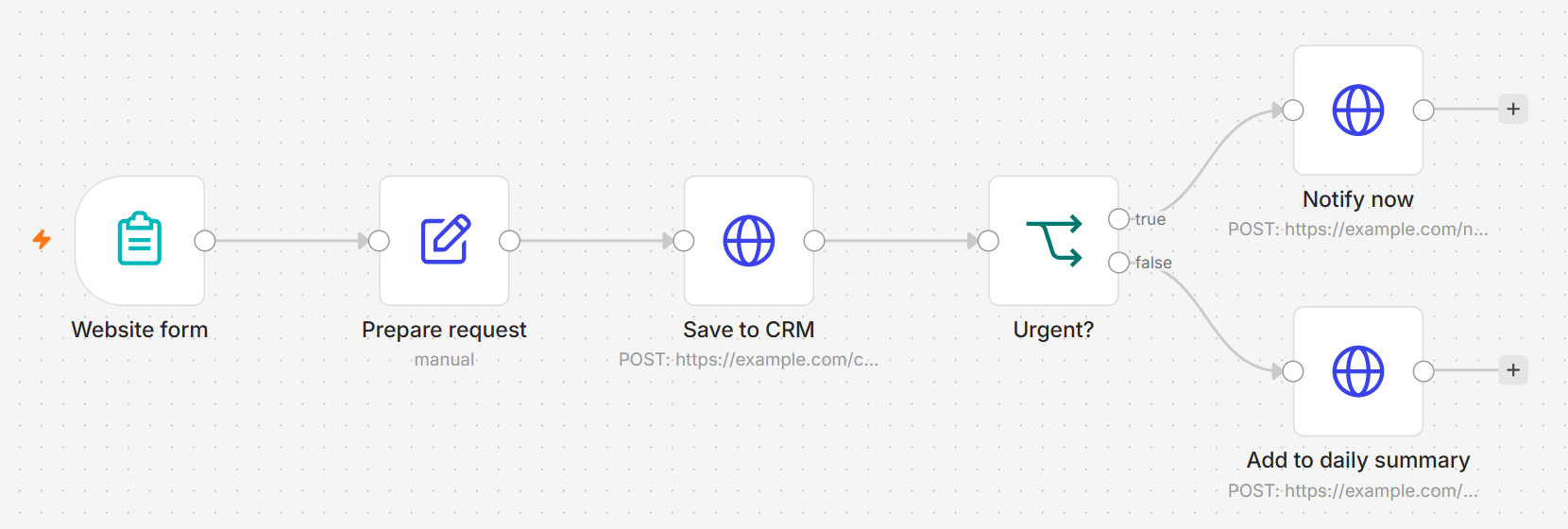
A simple example looks like this: someone fills in a form on a website, n8n saves the request in the customer management program and sends me a notification. Without automation I would do those three things by hand for every request.
 (enlarge)
n8n has hundreds of ready-made connections to popular programs and services. When a connection is missing, a step can send a plain request to the program’s interface or run a few lines of your own code. n8n can also pass data to a language model and act as an AI agent, but most everyday work is done by ordinary steps that do the same thing every time.
Claude Code builds my workflows today
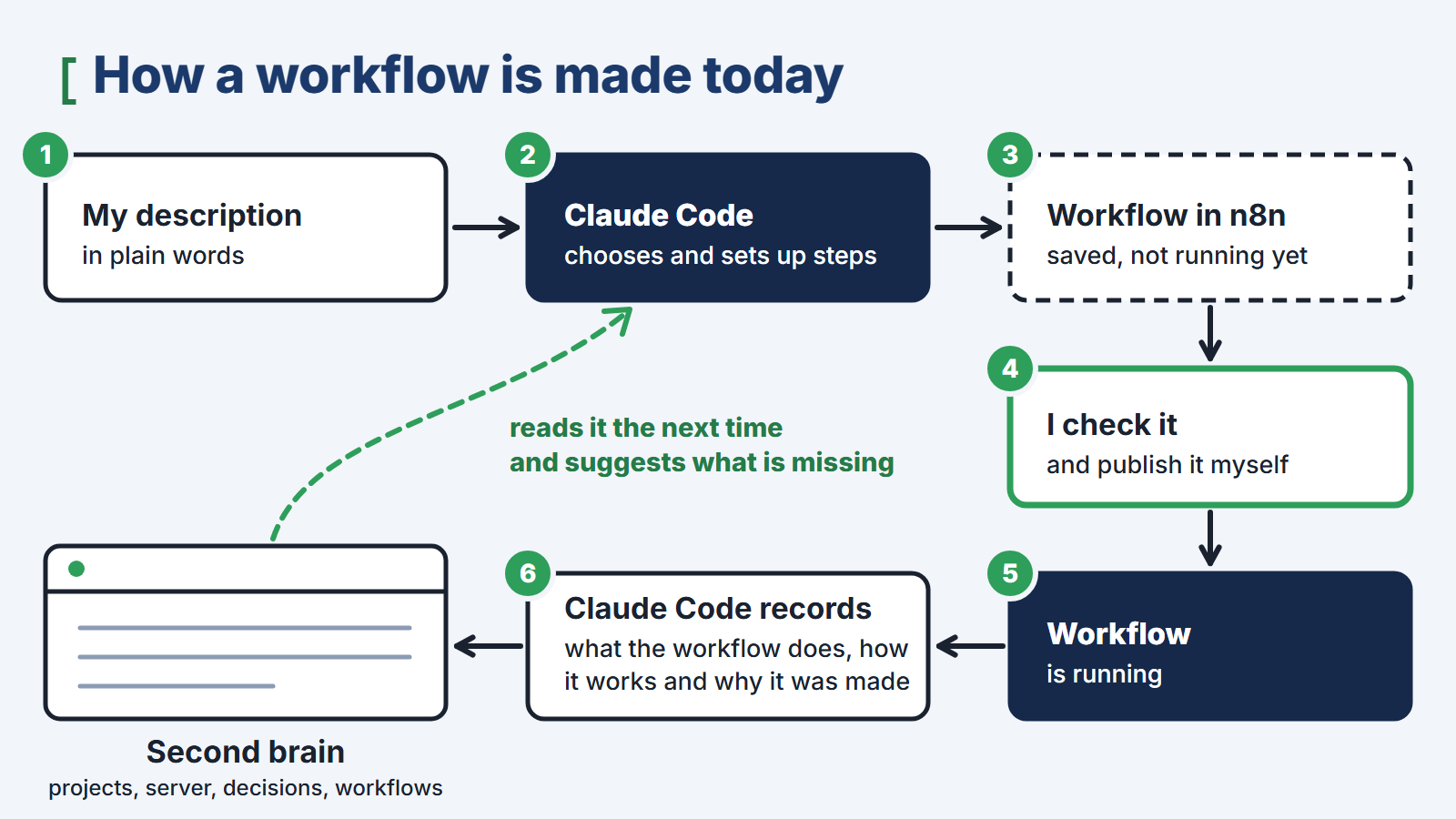
Until recently, building a workflow took hours: you had to choose the steps, fill in their fields and hunt for the reason the data was not arriving where it should. Today that work is done for me by Claude Code, an AI coding assistant built on a language model and connected directly to n8n. I describe in plain words what the workflow should do, and Claude Code chooses the steps, configures them and saves the finished workflow in n8n. That is also how the example in the picture above was made.
The biggest gain comes from connecting Claude Code to a second brain, an organized knowledge base about my projects, my server and my decisions. After building a workflow, Claude Code records in it what the workflow does, how it works and why it was created. So the next time it works on the server, it knows which workflows already run and why, and from the description of the programs on the server it suggests on its own which workflows are missing and which repetitive task is worth handing over to automation.
 (enlarge)
I still keep the final say, though. I check a workflow built by the model the same way I check one built by hand, and I publish it myself, because publishing is what actually puts it to work. I explain why further down, in the part about the limits of n8n.
What it replaces and what that means for costs
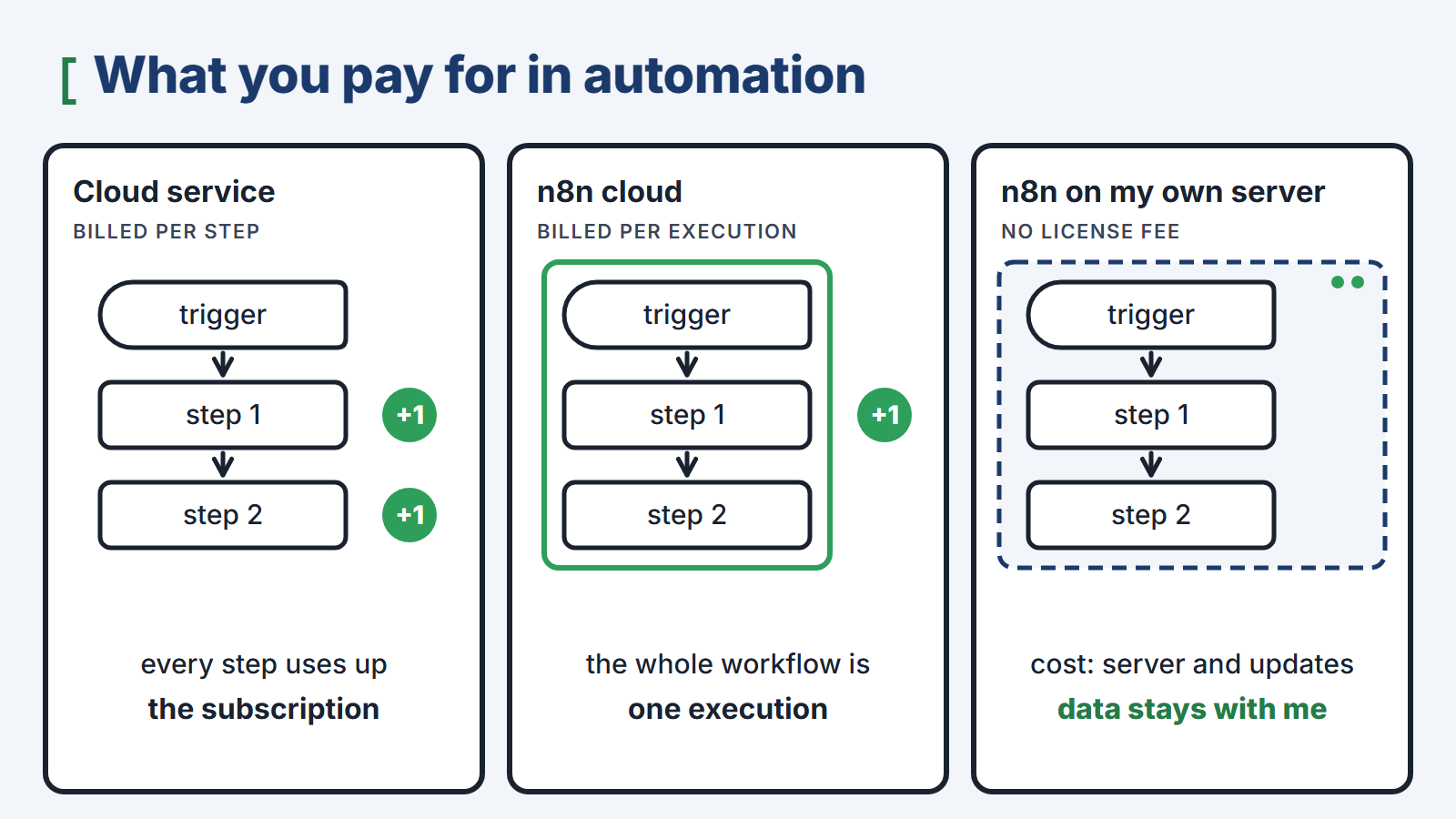
The best-known services of this kind, such as Zapier and Make, run in the cloud, and their providers bill customers by the number of steps their automations perform. Every new automation and every extra step uses up the subscription faster. The creators of n8n bill their cloud by executions of a whole workflow, regardless of the number of steps. On my own server I pay no license fee at all; the cost is a server I maintain anyway and the time spent on updates.
 (enlarge)
The second reason weighs more than cost. When automation runs in someone else’s cloud, all the data that flows through it also passes through its provider’s servers: form submissions, email addresses and customer data. On my own server that data stays with me.
The n8n source code is publicly available, but n8n is not open-source software. Its license, which the creators call fair-code, allows you to use the program in your own business and privately, but not to resell it to others as a service. For a company that automates its own work this restriction does not get in the way, but it is worth knowing before building a product for clients on top of n8n.
What n8n does for me
 (enlarge)
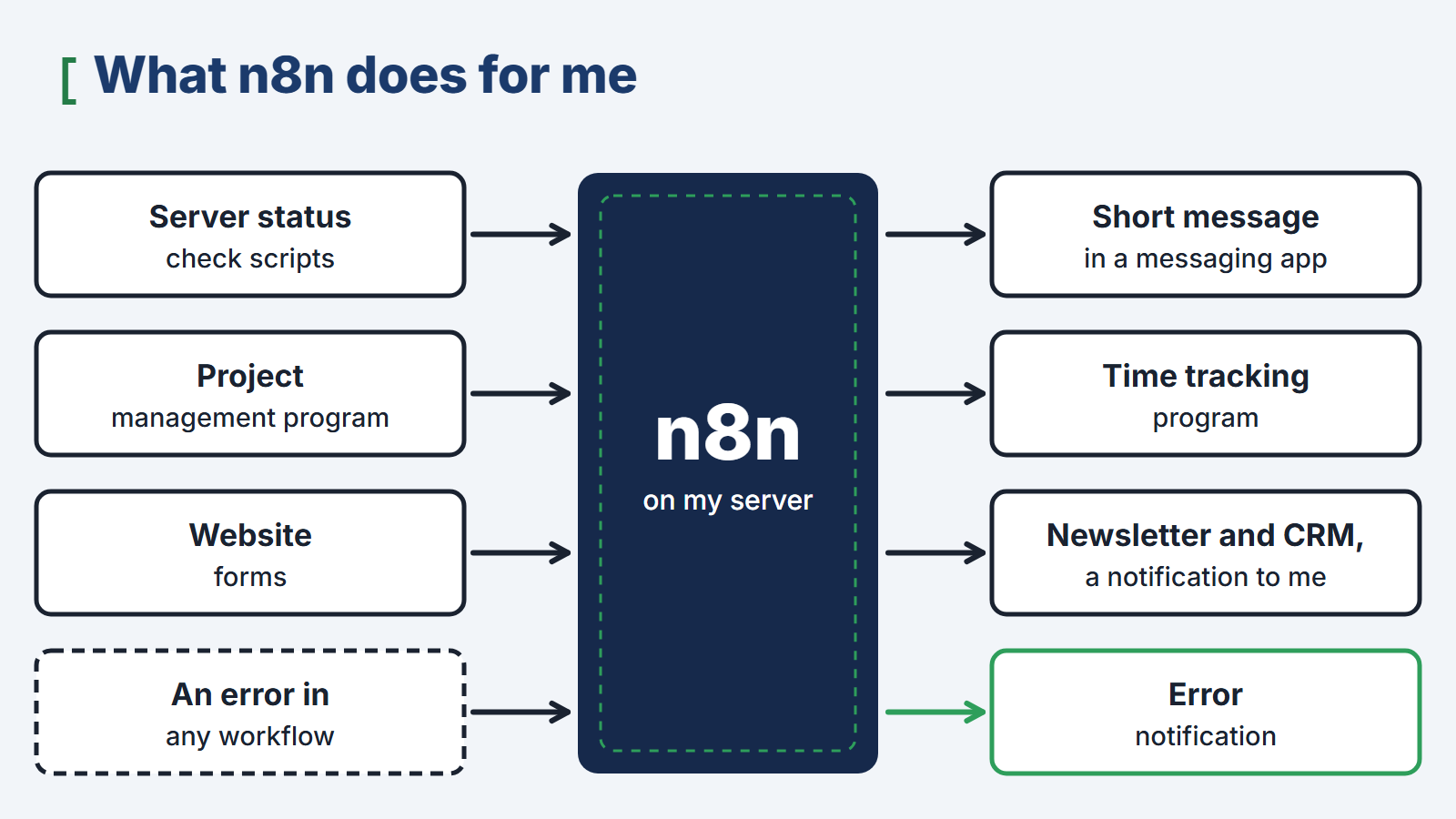
Server status reports. Scripts that regularly check the server produce raw data: numbers, states and dates. n8n receives them, compares them with thresholds and turns them into a short message in a messaging app that I can read in a few seconds. These are the reports I promised in the article about monitoring.
Projects and working time. When I create a new project in my project management program, n8n creates it in my time tracking program too. I do not retype names by hand, so there is no gap between what I work on and what I bill hours for. Both programs will get their own articles in this series.
Website forms. Newsletter sign-ups and messages from the contact form go through n8n to the newsletter system and to the customer management program, and I only receive a notification with a link to the request. The data of the people who filled in the form does not pass through any external automation service.
Error notifications. A separate workflow watches over the others. When one of them stops on an error, I get a message, so I know that some data has not reached its destination.
Where the limits are
A green check mark does not mean it worked. n8n marks a step green when the step has run, not when it has achieved its goal. If a step is set so that an error does not stop the workflow, the program on the other side can refuse the data and the canvas will still show a green check mark. The outcome is decided by that program’s response, so that is what you need to read, not the color on the canvas.
A saved change is not yet a deployed change. A running workflow executes the version that was published. A fix saved in the editor does not change how the workflow works until it is published again. It is easy to fix a bug and then spend several days looking for the reason the fix does not work.
The key without which a backup is useless. n8n stores passwords and access keys to other programs in encrypted form. A backup without the encryption key will restore the workflows but not the connections, and each of them will have to be set up again. The key should therefore be stored separately and as carefully as the backup itself. Backups will get an article of their own.
An automation that stays silent. When a report does not arrive, it can mean that everything is fine or that the automation has stopped working. That is why the uptime monitor checks n8n too, just like my websites, and workflow errors have their own notification. A tool that watches over others needs a watchdog of its own.
Does a small company need its own n8n
A cloud service will handle a few simple automations, and it is not worth setting up a server for them. Your own installation starts to pay off when the number of automations grows, when personal data flows through them, or when they connect programs that already run on your own server. At that point the cloud bill for steps grows month after month, and customer data passes through yet another company that has to be included in your data protection documentation.
I set up n8n for companies on their own servers, together with workflows tailored to the programs they use. The scope of that work is described on the page Your own server instead of subscriptions.
What comes next in this series
In the next article I will describe the project management tool that runs on my server instead of someone else’s cloud. It is the program from which n8n carries new projects over to time tracking.
Topics:
This text was written with the help of artificial intelligence tools, because that is how I work every day. I have checked every claim in it and I stand behind it under my own name. The drawings in this section were made the same way: they are vector graphics, written as code with the same help.
Juliusz Tomeczek, JT CONSULTING