
The October 2026 PHP Flaws: What They Mean for Your Company Website
Juliusz Tomeczek,
On October 21, the PHP team released fixes for two critical flaws. The flaws let an attacker remotely run any code they choose on a website’s server, without logging in and without knowing a single password. PHP is the programming language behind most websites, including those built on WordPress, so these flaws affect many businesses that have never heard of PHP.
In this article, I explain what happened, who needs to install the fixes, what WordPress site owners can check, and how a static website (the kind I build for clients) compares with a WordPress site.
What happened on October 21
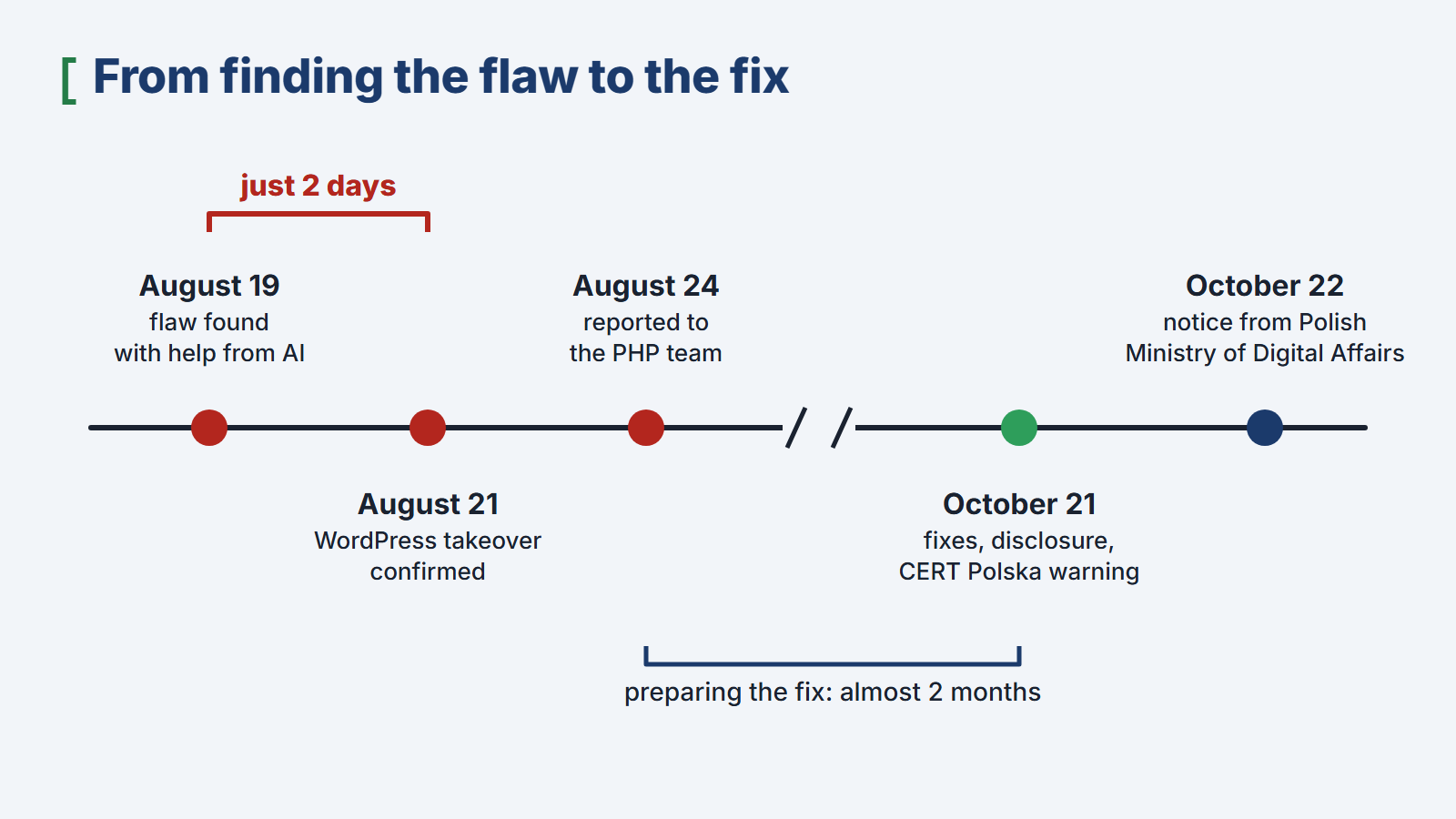
Researchers at Wiz (opens in a new tab), a cloud security company, found the flaws. They discovered one of them on August 19 with the help of AI models, and by August 21 they had confirmed that it could be used to take over a WordPress site without logging in. They then reported the flaws to the PHP team, which prepared fixes and released them on October 21, the same day the details were made public.
 (enlarge)
The US Cybersecurity and Infrastructure Security Agency (CISA) (opens in a new tab) urged organizations to patch immediately and to take offline any system that cannot be updated quickly. In Poland, where I work, CERT Polska (opens in a new tab) (the country’s national cybersecurity response team) also warned about the flaws on October 21 and advised organizations to be ready to patch immediately. The next day, the Ministry of Digital Affairs (opens in a new tab) issued its own warning. Some Public Information Bulletin (BIP) websites, which Polish public institutions use to publish official information, were temporarily taken offline while they were being secured.
The most important lesson is how little time there is to react. The researchers needed only two days to go from finding the first flaw to confirming that it could be used to break into a website. Once the details are public, criminals using the same kind of AI tools can prepare an attack just as fast, so website owners no longer have weeks to respond.
Why the flaws affect so many businesses
According to W3Techs (opens in a new tab), which tracks the technologies behind websites, PHP is used by 69.2% of websites whose server-side language can be identified. WordPress, which is itself written in PHP, powers 39.6% of all websites. Both figures are from October 25, 2026.
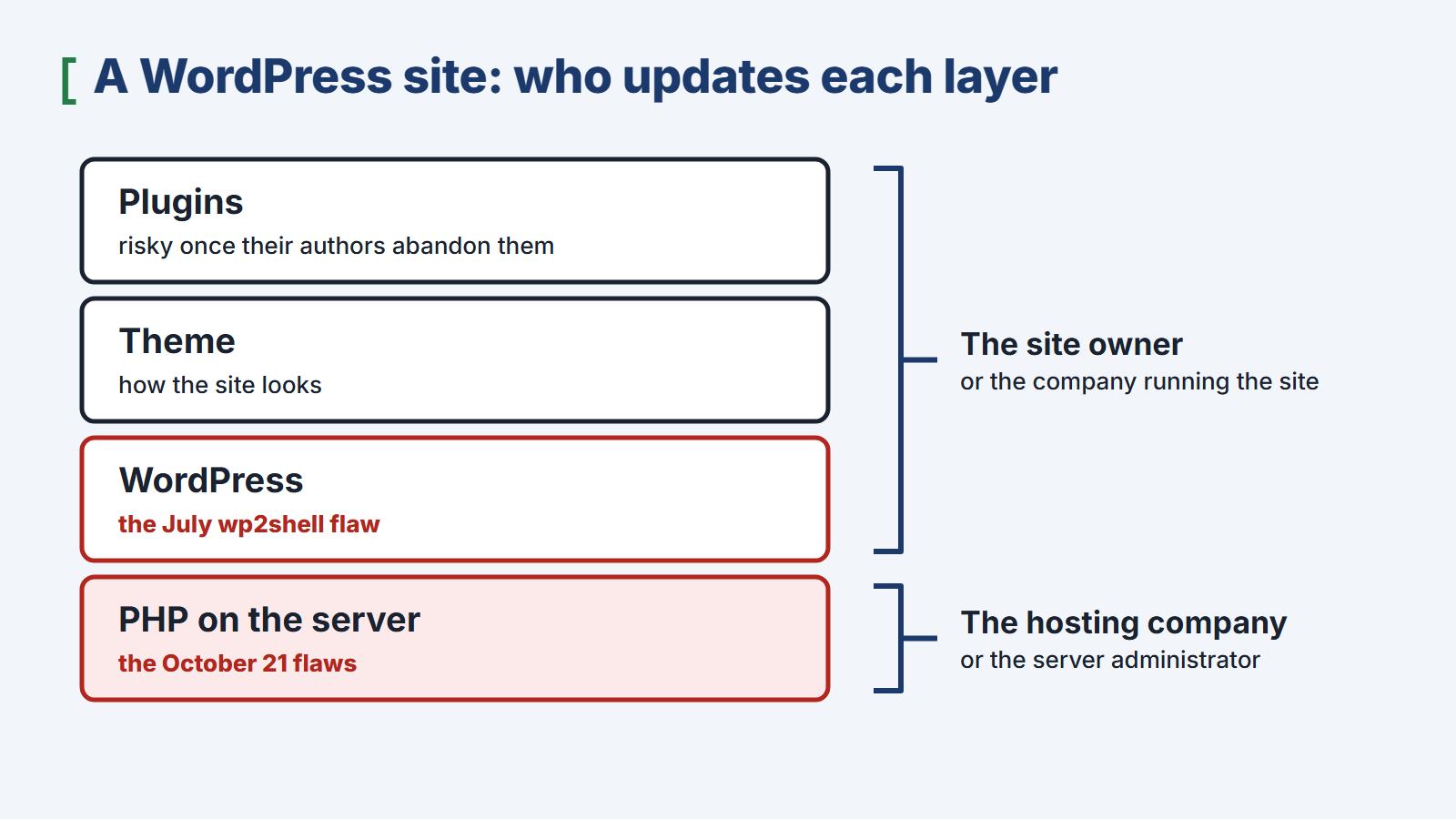
The flaws are in PHP, the program running on the server, not in WordPress itself. That is why updating WordPress, its theme, and its plugins does not remove them. The fixed version of PHP has to be installed by whoever manages the server. On a typical shared hosting plan, that is the hosting company. If your business runs its own server, the job falls to you or to the person who administers that server.
The fixed PHP versions are 8.5.12, 8.4.27, 8.3.36, and 8.2.35. Versions 8.1 and older are no longer supported, which means they will not get a fix for these flaws. CISA recommends taking any site that still runs on one of these versions offline if it cannot be upgraded quickly.
It’s not just PHP: WordPress and plugins
The PHP flaws are not the only threat to WordPress sites. In July 2026, researchers disclosed a separate critical flaw in WordPress itself, known as wp2shell. According to Wiz, criminals used it to upload fake plugins that planted backdoors on the server, so the attackers could quietly return to the site later.
This shows that a WordPress site has several layers that can each be attacked: PHP on the server, WordPress itself, the theme, and the plugins. Each layer needs regular updates. Plugins whose authors have stopped maintaining them are especially risky, because nobody fixes their flaws anymore.
 (enlarge)
What to check if your business website runs on WordPress
- Ask your hosting company whether it has installed a fixed version of PHP on your site’s server since October 21, or check its website for an announcement. If your site runs on your own server, ask the person who manages it.
- Update WordPress, your theme, and all plugins, and remove plugins you don’t use.
- Review the list of administrator accounts and remove any you don’t recognize.
- Make sure a current backup of your site exists and is stored somewhere other than the server the site runs on.
- Look for signs of infection. Search Google for
site:followed by your domain, for examplesite:yourcompany.com, and check whether the results include pages nobody at your company created. Also watch for warnings from browsers or from internet providers’ security filters; customers are often the first to see them and tell you. If you use Google Search Console (Google’s free tool for site owners), check its Security Issues report for alerts. - If you find signs of a break-in, report it to your country’s cybersecurity agency (in the US, CISA) and get help from someone experienced in cleaning up infected sites. Removing the visible symptoms is usually not enough, because a backdoor may remain on the server.
From my own work
Recently, I told two friends who run businesses that their WordPress sites had been infected. I don’t manage either site. On one of them, someone had added a hidden page advertising medications; it didn’t appear in the menu or in the list of pages in the WordPress dashboard. A large internet provider’s security filter now blocks that whole site as suspicious, so the provider’s customers see a warning instead of the site.
The site with the hidden page had been infected long before anyone discovered the PHP flaws, so the flaws are very unlikely to have caused that infection. I don’t know how the other site was infected. In both cases, the owners learned about the problem from me, not from any security monitoring of their own.
Static websites: what they are and what they don’t protect against
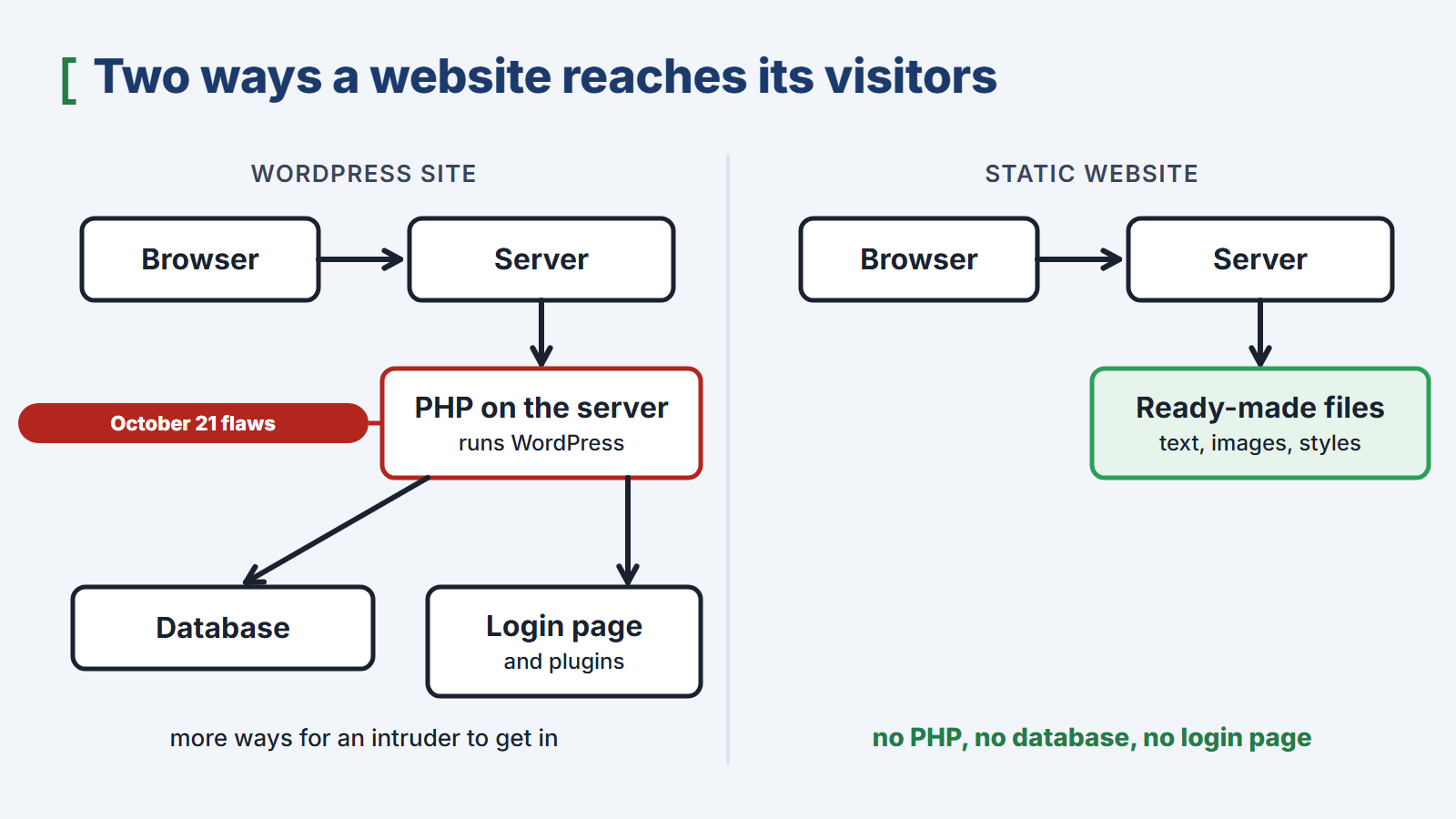
A static website is a set of ready-made files: text, images, and style sheets. The files are built in advance and rebuilt only when the site’s content changes, so the server simply sends every visitor the same files. When someone visits the site, no PHP code runs. The site doesn’t use a database at all, and it has no login page.
 (enlarge)
A static website is safer than a WordPress site for two reasons. First, the PHP flaws disclosed on October 21 can’t be used against the site itself, because it doesn’t use PHP. If PHP is installed on the same server for other reasons, the server still needs the fix. Second, an intruder has far fewer ways in: the site has no login form where an attacker could guess passwords, and no plugins whose flaws could be exploited.
A static website is not fully immune to attacks, though. It still sits on a server that has to be updated, and if it has a contact form, the messages are handled by a separate program that also needs maintenance. The tools used to build the site need updates too.
WordPress has its strengths. It works well when several people at a company regularly publish content themselves, or when the site is a store with many products. A static website suits businesses that publish rarely or would rather leave publishing to someone outside the company. For those businesses, an admin dashboard is just one more way in for attackers and one more program to keep updated.
How I work
I use Astro (opens in a new tab), a framework for static sites, to build my clients’ websites. As part of my ongoing work with each client, I also look after the site’s server and forms, and I publish new content or make changes whenever the client asks. The Websites for companies page describes how this ongoing work is organized.
If your business website runs on WordPress and you’re not sure what shape it’s in, I can audit it. I’ll check whether the site is infected, whether security filters are blocking it, and whether WordPress, its theme, its plugins, and PHP are up to date. Then I’ll tell you what needs fixing. Get in touch through the contact form.
Questions and answers
Does updating WordPress fix the PHP flaws disclosed on October 21? No. The flaws are in PHP, the program running on the server, so only a fixed version of PHP, installed by your hosting company or server administrator, removes them.
How can I check whether my site runs a fixed version of PHP? The simplest way is to ask your hosting company. Many hosting companies also show the PHP version in their customer dashboard. The fixed versions are 8.5.12, 8.4.27, 8.3.36, and 8.2.35; any later release in the same series includes the fix as well.
Is a static website completely immune to attacks? No, but it gives attackers far fewer ways in: no PHP code runs when someone visits, the site doesn’t use a database, and there is no login page. Its server and forms can still be attacked, though, so they need ongoing maintenance.
What should I do if a browser or internet provider warns people about my site? Treat the warning as a sign of a possible infection. Have the site checked. If it is infected, have someone experienced clean it and remove the cause of the break-in. Then ask the company that shows the warning, such as the browser maker or the internet provider, to review the site again. The warning usually stays until the site is clean and that company has reviewed it.
Topics:
- Websites
This text was written with the help of artificial intelligence tools, because that is how I work every day. I have checked every claim in it and I stand behind it under my own name. The drawings in this section were made the same way: they are vector graphics, written as code with the same help.
Juliusz Tomeczek, JT CONSULTING